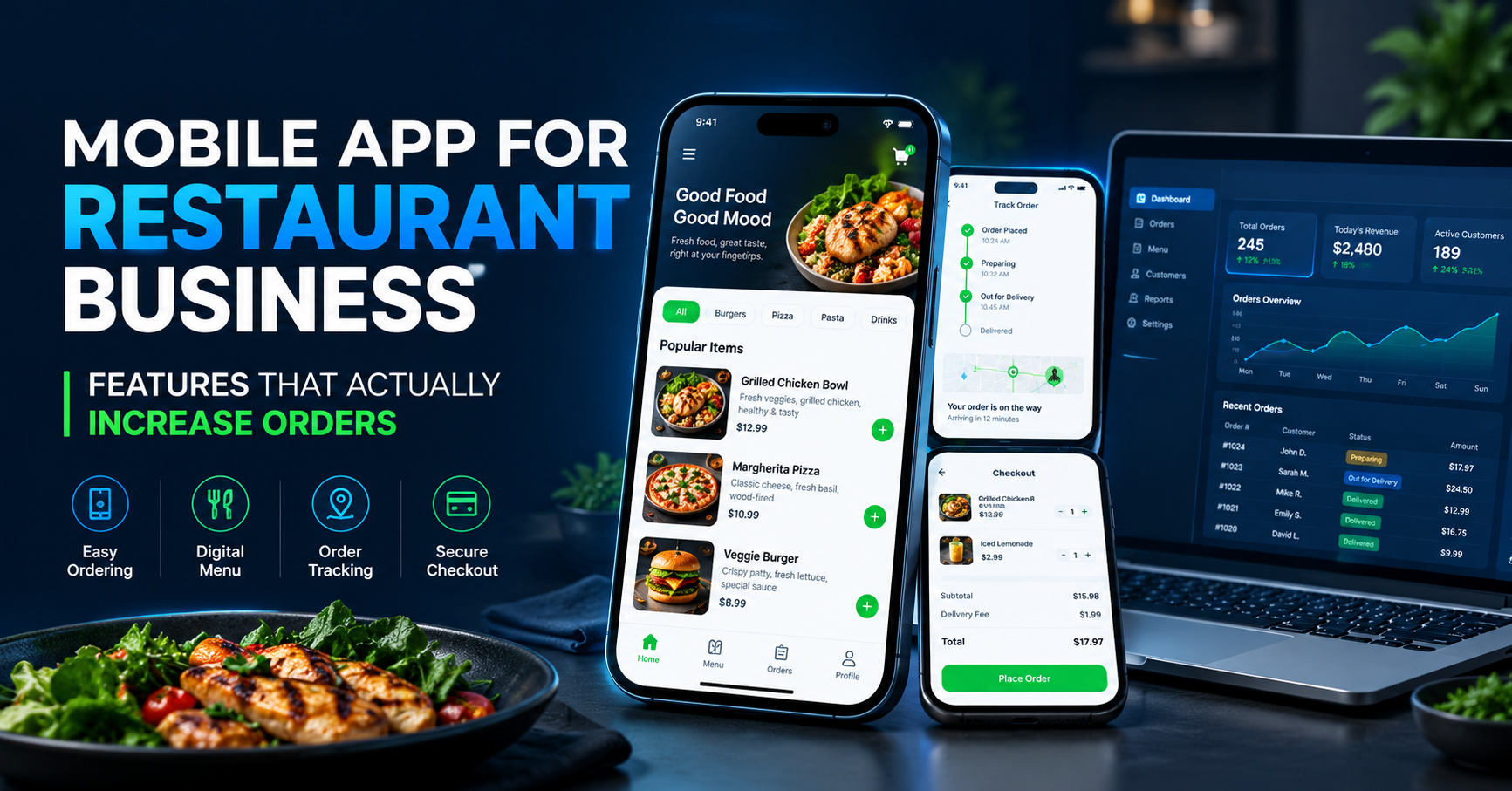
Mobile App for Restaurant Business – Features That Actually Increase Orders
The restaurant business has changed a lot in recent years. Customers no longer want to call a restaurant every time they need to order food. They prefer browsing a menu on their phone, selecting their favourite dishes, making a payment online, and tracking their order without any confusion.
This is why investing in a mobile app for restaurant business can be a smart decision for restaurants, cafes, cloud kitchens, food outlets, and restaurant chains.
A well-designed restaurant mobile app does more than display a menu. It helps customers order conveniently, discover special offers, reorder their favourite meals, and stay connected with your brand. For restaurant owners, it can also improve order management, customer retention, and overall business efficiency.
However, simply launching an app does not guarantee more orders. The real difference comes from choosing the right features that make ordering easier and encourage customers to return.
In this article, we will explore the most important restaurant app features that can help increase orders and support long-term business growth.
Why Does a Restaurant Business Need a Mobile App?
Today, customers expect convenience. Whether they are ordering lunch at work, dinner at home, or snacks for a family gathering, they want a simple and fast ordering experience.
A restaurant mobile app allows businesses to offer that convenience directly to customers.
Instead of depending entirely on phone calls or third-party food delivery platforms, restaurants can create their own digital ordering channel. This gives them more control over their menu, promotions, customer experience, and ordering process.
Some major benefits include:
More ordering opportunities: Customers can browse and place orders whenever ordering is available.
Better customer relationships: Your restaurant can communicate directly with customers who have opted in for updates.
Repeat purchases: Saved addresses, order history, and reorder options make buying again easier.
Promotional flexibility: Restaurants can offer coupons, meal deals, and seasonal discounts.
Improved order management: Incoming orders can be organised through a connected restaurant dashboard.
Stronger brand recognition: Your restaurant remains accessible through its own branded app.
A restaurant app should be developed around real customer behaviour. The goal is not to add as many features as possible, but to remove the problems that prevent customers from completing an order.
1. Simple Online Food Ordering System
The online food ordering system is one of the most important features of a restaurant mobile app.
Customers should be able to open the app, browse available dishes, select their preferred items, and place an order without going through unnecessary steps.
If the ordering process is confusing or takes too long, customers may leave before completing their purchase.
A good ordering system should include:
Easy food category navigation
Clear dish names and descriptions
Food images and prices
Customisation options for selected dishes
Quantity selection
Add-to-cart functionality
Clear checkout and order confirmation
For example, a customer ordering a burger should be able to select the size, add extra cheese, choose available add-ons, and proceed to checkout without confusion.
How it increases orders: A smooth ordering experience reduces friction and makes it easier for customers to complete their purchases.
2. Attractive Digital Menu With Food Images
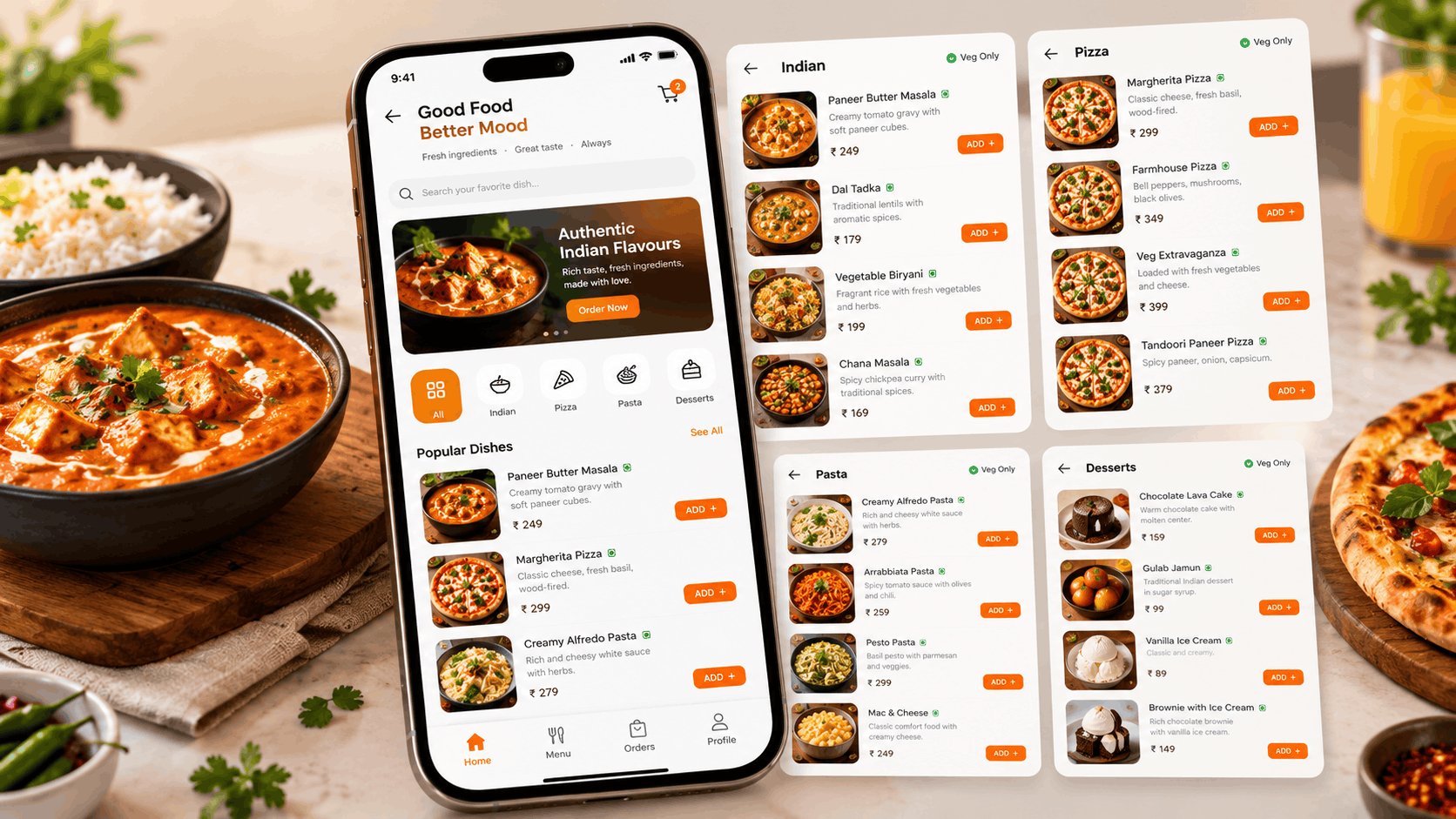
A digital menu is much more useful when customers can see what they are ordering.
High-quality food images help customers understand the dishes and make decisions more confidently. A menu with clear descriptions, prices, ingredients, and customisation options can also reduce confusion.
For a restaurant mobile app, consider including:
High-quality food photographs
Vegetarian and non-vegetarian labels where relevant
Food categories such as starters, main course, desserts, and beverages
Ingredient and allergen information where applicable
Portion sizes and available variations
Best-selling dishes
Availability status for each item
Restaurant owners should also be able to update prices, remove unavailable dishes, and add new items through an admin panel.
How it increases orders: A clear, attractive menu helps customers discover more dishes and choose items that suit their preferences.
3. Quick Checkout and Multiple Payment Options
Customers should not have to complete a long checkout process after choosing their food.
A well-planned restaurant ordering app should collect only the information necessary to fulfil the order. Delivery address, contact details, order summary, delivery charges, and the final payable amount should be easy to understand.
Depending on the restaurant's business model and supported payment providers, the app may offer:
UPI payments
Debit and credit cards
Supported mobile payment options
Cash on delivery, where available
Saved delivery addresses
Clear payment confirmation
Digital receipts and order summaries
The payment process should be secure, and payment status should be handled reliably so customers are not left wondering whether their order was successful.
How it increases orders: A faster checkout with clear pricing and convenient payment methods can reduce abandoned carts and improve the overall buying experience.
4. Push Notifications for Offers and New Dishes
Push notifications allow restaurants to send timely updates to customers who have permitted notifications.
Instead of waiting for customers to open the app, a restaurant can inform interested users about selected offers, new menu items, limited-time meal deals, and relevant ordering updates.
For example, a restaurant might send a lunch offer around lunchtime or announce a new seasonal menu to customers who have shown interest in similar dishes.
Useful notification ideas include:
Special weekend offers
New menu announcements
Festival meal packages
Personalised discounts
Order status updates
Limited-time promotions
However, sending too many notifications can annoy users and encourage them to uninstall the app. Notifications should be relevant, useful, and easy to control.
How it increases orders: Timely promotions can bring customers back to the app and encourage them to place an order when they are ready to buy.
5. Loyalty Points, Rewards, and Referral Offers
Getting a new customer is important, but encouraging existing customers to order again is equally valuable.
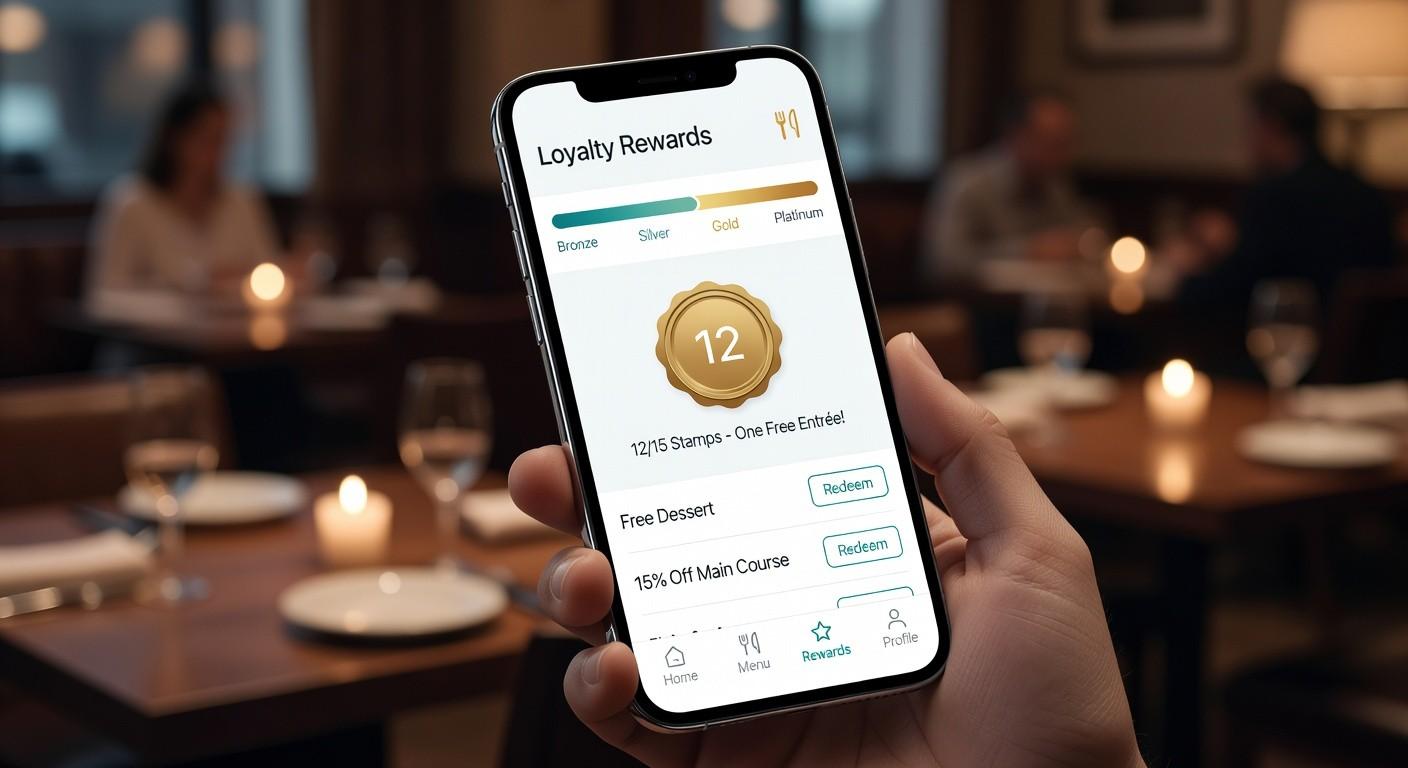
A loyalty programme gives customers a reason to choose your restaurant repeatedly. Instead of offering discounts to everyone, restaurants can reward customers based on their purchases or participation in a clearly defined programme.
Useful loyalty features include:
Points earned on eligible orders
Reward redemption
Special offers for repeat customers
Birthday or anniversary offers, with customer permission
Referral rewards under clear terms
Membership benefits
Milestone rewards for regular customers
For example, a restaurant could offer a reward after a customer completes a certain number of eligible purchases. Another option is a referral programme that rewards existing customers when their invited friends place qualifying orders.
The reward structure should be simple enough for customers to understand. Complicated conditions can make the programme less attractive.
How it increases orders: Meaningful rewards encourage repeat purchases and help build long-term relationships with customers.
6. Real-Time Order Tracking and Status Updates
After placing an order, customers want to know what is happening next.
A restaurant mobile app can display useful order stages such as order received, preparation started, ready for pickup, dispatched, and delivered. The exact stages should match the restaurant's operations.
For delivery orders, live location tracking may also be available if the delivery system supports it.
Important tracking features include:
Order confirmation
Preparation status
Pickup or dispatch updates
Estimated delivery time
Delivery status
Notifications when the order status changes
Accurate status updates are important. Showing incorrect delivery estimates or leaving orders stuck on the same status can damage customer trust.
How it increases orders: Clear updates reduce uncertainty, improve customer confidence, and create a more professional ordering experience.
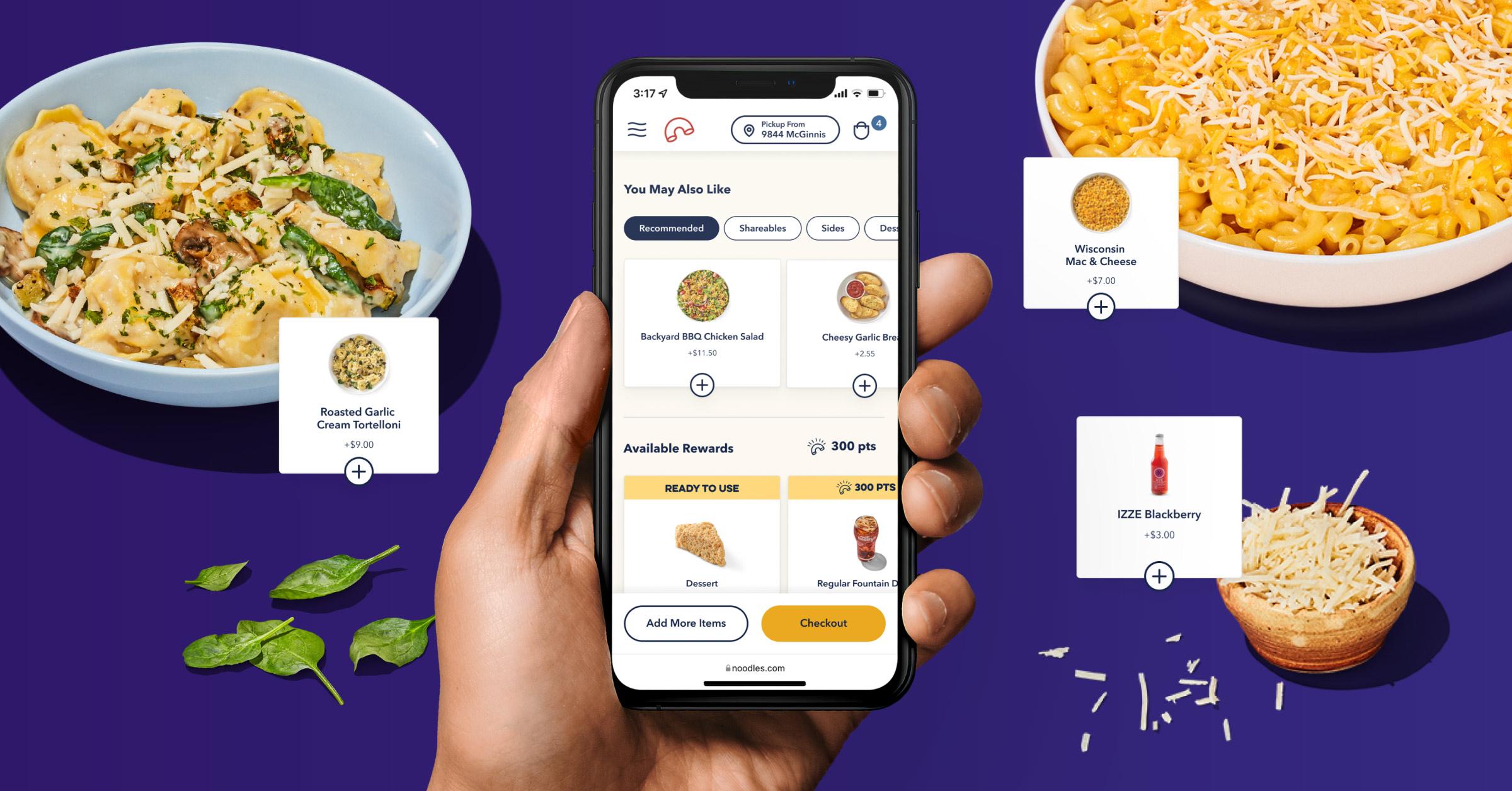
7. Personalised Recommendations and Smart Upselling
Not every customer wants the same food. Some prefer vegetarian meals, others order family combos, and some regularly purchase desserts or beverages.
A restaurant app can use relevant menu suggestions and previous order information, where appropriate, to make the shopping experience more useful.
Examples include:
Suggesting a drink with a meal
Showing a dessert that complements the selected items
Recommending a family combo for multiple people
Displaying popular dishes in a selected category
Offering a relevant add-on before checkout
Providing an easy reorder option
Artificial intelligence can also support more advanced recommendations when the restaurant has suitable data and a clear use case. However, a simple rule-based recommendation system may be sufficient for many small businesses.
Recommendations should remain helpful rather than making checkout feel cluttered or pressuring customers into unnecessary purchases.
How it increases orders: Relevant add-ons and meal combinations can improve average order value while helping customers discover more of the menu.
8. Easy Reordering and Saved Favourites
Many restaurant customers order the same meals regularly. They may have a preferred breakfast, office lunch, or weekend family meal.
Making these purchases easier can improve the customer experience and reduce the effort required to place another order.
A restaurant app should consider offering:
Previous order history
Reorder in one or two simple steps
Favourite dishes
Saved addresses
Frequently ordered combinations
Easy access to recently purchased items
For example, a customer who orders the same lunch every weekday should not have to search through the entire menu each time.
The app should still show the current price, availability, and relevant customisation options before the customer confirms the order.
How it increases orders: Convenient reordering makes repeat purchases faster and gives customers a practical reason to continue using the app.
9. Offers, Coupons, and Combo Meals
Discounts can attract customers, but they should be planned carefully so that the restaurant does not sacrifice too much profit.
A restaurant mobile app can include a coupon management system that allows the business to create offers for selected products, order values, customer groups, or promotional periods.
Common offer types include:
First-order discounts
Minimum-order-value coupons
Lunch and dinner combos
Family meal packages
Seasonal promotions
Free delivery on eligible orders
Special rewards for repeat customers
For example, a restaurant could offer a meal combo at a price that is attractive to customers while still maintaining a reasonable margin.
Restaurant owners should track which offers generate profitable orders instead of judging a campaign only by the number of coupons redeemed.
How it increases orders: Well-planned promotions can encourage customers to try new dishes, place larger orders, and return during quieter periods.
10. Admin Panel for Restaurant Owners
A restaurant app is not complete without an effective system for managing its daily operations.
An admin panel allows authorised restaurant staff to control the menu, review orders, manage offers, and monitor business activity from a central dashboard.
Depending on the restaurant's requirements, the admin panel may include:
Add, edit, and remove food items
Manage categories and pricing
Update item availability
View and manage incoming orders
Update order statuses
Create promotional offers
Manage customer information appropriately
Review sales and order reports
Manage restaurant branches and staff permissions
For restaurants with multiple outlets, branch-wise reporting and order management can also be useful.
A well-organised dashboard helps staff spend less time handling repetitive tasks and more time focusing on food quality and customer service.
How it increases orders: Efficient order handling helps restaurants manage demand, avoid missed orders, and deliver a more consistent customer experience.
11. Ratings, Reviews, and Customer Feedback
Customer feedback helps restaurants understand what is working and what needs improvement.
A restaurant app can allow customers to rate completed orders, review dishes, and share feedback about delivery, packaging, and service.
Useful feedback features include:
Star ratings after completed orders
Dish-specific reviews
Feedback forms
Complaint and support options
Order-related issue reporting
Review moderation tools for administrators
Feedback should be handled professionally. Restaurants should not rely on fake reviews or manipulate ratings to create a misleading impression.
When customers report a problem, a clear support process can help the restaurant respond and resolve the issue.
How it increases orders: Genuine reviews and responsive customer service can build trust and help new customers make informed purchasing decisions.
12. Fast Performance and a User-Friendly Design
Even a feature-rich restaurant app can struggle if it loads slowly or is difficult to use.
Customers usually want to find food, add items, and complete checkout without unnecessary delays. A confusing interface can cause users to leave before placing an order.
During restaurant app development, businesses should prioritise:
Fast loading screens
Simple navigation
Readable text and prices
Clear buttons and calls to action
Reliable cart functionality
Smooth checkout
Compatibility with supported mobile devices
Accessible design
Secure handling of customer information
The app should also be tested under realistic conditions, including slow internet connections and busy ordering periods.
How it increases orders: A fast, reliable, and easy-to-use application removes common barriers between browsing the menu and completing a purchase.
13. Analytics to Understand Customer Behaviour
Restaurant owners need more than a list of completed orders. They need to understand how customers use the app and which features are contributing to business growth.
An analytics dashboard can help track:
Total orders and order value
Best-selling food items
Repeat purchase rates
Average order value
Cart abandonment
Coupon usage
Promotional campaign performance
Order cancellations
Customer retention
For example, if many customers add food to their carts but leave before paying, the restaurant can investigate delivery charges, checkout complexity, payment failures, or other potential issues.
Analytics should be used to identify problems and test improvements rather than assuming that every new feature will automatically increase sales.
How it increases orders: Data helps restaurants make better decisions, improve weak points in the ordering process, and focus on features that deliver measurable results.
14. Website Integration and Multi-Channel Ordering
A restaurant does not necessarily need to depend on a mobile app alone. A mobile-friendly website can serve customers who prefer ordering through a browser instead of installing an application.
Businesses can build a connected ordering experience across their website and mobile app, using a shared menu and suitable order management infrastructure.
Depending on the business model, useful integrations may include:
Restaurant website and online ordering
Android and iOS applications
Payment gateway integration
SMS and order notifications
Customer support tools
Delivery management systems
Inventory or point-of-sale software
Reporting and analytics
For restaurants that want to develop their own digital ordering platform, integration should be planned carefully so that orders, payments, and customer updates remain consistent across channels.
How it increases orders: Multiple convenient ordering channels make the restaurant accessible to more customers and allow the business to offer a consistent experience.
How Much Does Restaurant Mobile App Development Cost?
The cost of developing a mobile app for a restaurant business depends on its features, design, technology, integrations, and operational requirements.
A basic app with a digital menu and simple ordering functionality will generally require less development effort than a complete platform with customer accounts, payment integration, delivery tracking, loyalty rewards, analytics, and a multi-branch admin panel.
The main factors that influence the development cost include:
Number of screens and app platforms
UI and UX design requirements
Customer app and admin panel functionality
Payment and notification integrations
Delivery tracking requirements
Custom software and API development
Security and testing requirements
Hosting, maintenance, and future updates
The best approach is to identify the essential features first and then plan additional functionality based on the restaurant's budget and growth goals.
A small cafe may only need an online menu, ordering, payments, and an admin dashboard. A restaurant chain may need branch management, advanced analytics, loyalty programmes, and additional integrations.
The right solution is one that fits your operations instead of paying for features your business may not need.
How to Choose the Right Restaurant App Development Company in Delhi
Choosing an experienced development partner is important because your app must support real restaurant operations, not just look attractive.
Before selecting a restaurant app development company in Delhi, consider the following points:
1. Understand your business requirements
The development team should understand your menu, order volume, delivery model, payment needs, and customer expectations.
2. Check the development team's technical capabilities
Look for experience in mobile app development, web applications, API integration, database design, and admin panel development.
3. Ask about security and reliability
Discuss authentication, access controls, secure payment integration, data protection, testing, and ongoing maintenance.
4. Confirm the deliverables
Understand whether the project includes Android or iOS apps, the admin panel, website integration, domain setup, deployment, and technical documentation.
5. Plan for future growth
Your application should be designed so that additional features, menu items, integrations, and restaurant branches can be supported as the business grows.
A reliable development partner will help you prioritise useful features, establish a realistic project scope, and plan for long-term maintenance.
Build a Restaurant Mobile App With HNB IT Solutions
At HNB IT Solutions, we provide software development and digital technology services to businesses looking to strengthen their online presence.
Our services include mobile app development, web app development, AI tools development, payment gateway integration, SMS and bulk SMS services, digital marketing, and software consultancy.
For restaurant businesses, a custom application can be planned around your specific requirements, whether you need a digital menu, online food ordering, payment integration, an admin panel, customer notifications, or a complete restaurant ordering platform.
We can help you plan the application, select suitable features, and develop a digital solution that supports your business goals.
Our development approach focuses on practical functionality, user-friendly design, and the ability to expand the application as your requirements change.
Looking for a mobile app for your restaurant business?
Visit HNB IT Solutions to discuss your restaurant app development requirements.
Website: https://hnbitsolutions.com/
Email: [email protected]
Phone: +91 92665 57954
Contact our team to discuss a custom mobile app, web application, or restaurant ordering system for your business.
Frequently Asked Questions (FAQs)
1. What is a mobile app for restaurant business?
A mobile app for restaurant business is an application that allows customers to browse menus, place food orders, make payments through supported methods, receive updates, and access restaurant services from their smartphones.
2. Which features are most important in a restaurant ordering app?
The most important features usually include an easy-to-use menu, online ordering, a shopping cart, secure payment integration, order tracking, notifications, and an admin panel. Loyalty rewards and analytics can be added based on business needs.
3. Can a restaurant mobile app help increase orders?
Yes, a well-designed app can help increase orders by simplifying checkout, encouraging repeat purchases, promoting relevant offers, and making the restaurant easier to order from. Actual results depend on food quality, pricing, customer demand, marketing, and the overall ordering experience.
4. Is a restaurant app better than a third-party food delivery platform?
Both options serve different purposes. Third-party platforms may provide access to an existing customer base, while a restaurant's own app gives the business more control over its branding, ordering experience, and customer relationships. Restaurants should compare costs, reach, operational requirements, and customer preferences before deciding.
5. Can a restaurant have both a mobile app and a website?
Yes. A restaurant can provide ordering through a mobile app and a mobile-friendly website. With suitable integration, both channels can use connected menus, payment systems, and order management tools.
6. How much time does it take to develop a restaurant mobile app?
The development timeline depends on the number of features, design complexity, integrations, testing requirements, and supported platforms. A simple ordering application generally requires less time than a customised platform with delivery tracking, loyalty programmes, and multi-branch management. A timeline should be estimated after the requirements are defined.
7. Why should I choose a custom restaurant app?
A custom app allows the restaurant to select features based on its workflow, branding, customer needs, and growth plans. It can also be integrated with suitable business systems instead of relying entirely on a standard solution.
Conclusion
A successful mobile app for restaurant business should do more than bring your menu online. It should make ordering easier, encourage customers to return, simplify restaurant operations, and help the business understand what customers actually want.
Features such as quick checkout, digital menus, loyalty rewards, push notifications, easy reordering, order tracking, and business analytics can all contribute to a better ordering experience when implemented correctly.
Restaurant owners should begin with the features that solve their biggest problems and expand the application as their business grows.
With the right planning and development partner, a restaurant mobile app can become a valuable part of your digital business strategy.
If you are planning to launch a restaurant ordering app or upgrade your existing system, HNB IT Solutions can help you explore a solution suited to your requirements.