AI Tool for Inventory Management – Real Example From Our Client
Managing inventory may look simple from the outside, but businesses that handle hundreds or thousands of products know how difficult it can become.
From checking available stock and updating product quantities to managing purchase orders, tracking sales, and avoiding stock shortages, inventory management involves a lot of daily work.
Many businesses still depend on Excel sheets, manual records, and multiple software tools to manage their inventory. These methods may work when the business is small, but as the number of products and orders increases, things can become confusing.
This is where an AI tool for inventory management can make a real difference.
With the help of Artificial Intelligence, businesses can automate repetitive inventory tasks, identify stock-related problems, understand product demand, and make better decisions using their business data.
At HNB IT Solutions, we develop custom AI tools, web applications, and software solutions designed around the actual needs of businesses. In this article, we are sharing a practical client-style example of how an AI-powered inventory management solution can improve everyday stock management.
Note: Client privacy is maintained, and specific company names, confidential data, and unverified performance figures have not been disclosed.
What Is an AI Tool for Inventory Management?
An AI tool for inventory management is software that uses Artificial Intelligence, data analysis, and automation to help businesses manage their stock more efficiently.
Traditional inventory software generally allows users to add products, update quantities, track sales, and manage purchases. An AI-powered system can go further by analysing inventory data and providing useful insights.
For example, an AI inventory management tool can help businesses:
- Track stock levels in real time.
- Identify products that are running low.
- Analyse sales and inventory patterns.
- Predict possible future stock requirements.
- Reduce repetitive data-entry work.
- Generate inventory reports.
- Help identify slow-moving products.
- Support purchase planning.
- Provide useful answers through an AI assistant.
The exact features depend on the business, the available data, and the type of inventory being managed.
The main purpose is simple: help businesses spend less time managing stock manually and more time focusing on growth.
Why Businesses Need AI-Based Inventory Management
Inventory problems can affect almost every part of a business.
When stock records are incorrect, a company may purchase products it already has or fail to order products that customers need. This can lead to unnecessary expenses, delays, and customer dissatisfaction.
Some common inventory management problems include:
1. Manual Stock Updates
Employees may need to update stock quantities after every purchase or sale. When this process is done manually, mistakes can happen.
2. Difficulty Tracking Multiple Products
Businesses with large product catalogues may find it difficult to identify which products are available, out of stock, or moving slowly.
3. Lack of Useful Inventory Insights
A basic stock report may show current quantities, but it may not explain why certain products are selling faster than others.
4. Time-Consuming Reports
Preparing daily, weekly, or monthly inventory reports manually can take a lot of time.
5. Unplanned Purchasing
Without proper sales and stock analysis, businesses may struggle to decide when and how much inventory to purchase.
An AI-powered inventory management system can help organise this information and support more informed decisions.
Real Example From Our Client: Building a Custom AI Inventory Management Tool
One of the important lessons we have learned while working on business software is that every company manages inventory differently.
A business may have its own product categories, purchasing process, sales records, warehouse structure, and reporting requirements. A ready-made inventory application may not always fit these needs.
For this type of requirement, a custom AI inventory management tool can be developed around the existing business workflow.
For this case example, we will refer to the business as Client A to maintain confidentiality.
The Client's Inventory Management Challenge
The client needed a better way to organise product information and monitor inventory-related activities.
The business was dealing with several common challenges:
- Product information was maintained across different records.
- Stock updates required manual effort.
- Finding specific product information took time.
- Inventory reports needed to be prepared regularly.
- The team wanted a more convenient way to understand stock data.
- Management required a centralised system for inventory-related information.
The problem was not simply the absence of inventory software. The bigger challenge was having a system that could fit the company's working process.
The client wanted a solution that was easy to use, scalable, and capable of supporting AI-based features in the future.
Our Approach: Developing a Custom AI Inventory Management Solution
At HNB IT Solutions, our approach to software development starts with understanding the actual business problem.
Instead of immediately adding unnecessary features, we focus on identifying the daily tasks that consume the most time and determining where automation can provide value.
For the inventory management project, the solution could be structured around three important areas:
- Inventory management dashboard
- Automated stock-related workflows
- AI-powered inventory insights
The final features of a system depend on the client's business requirements, data availability, and technical environment.
Important Features of an AI Inventory Management Tool
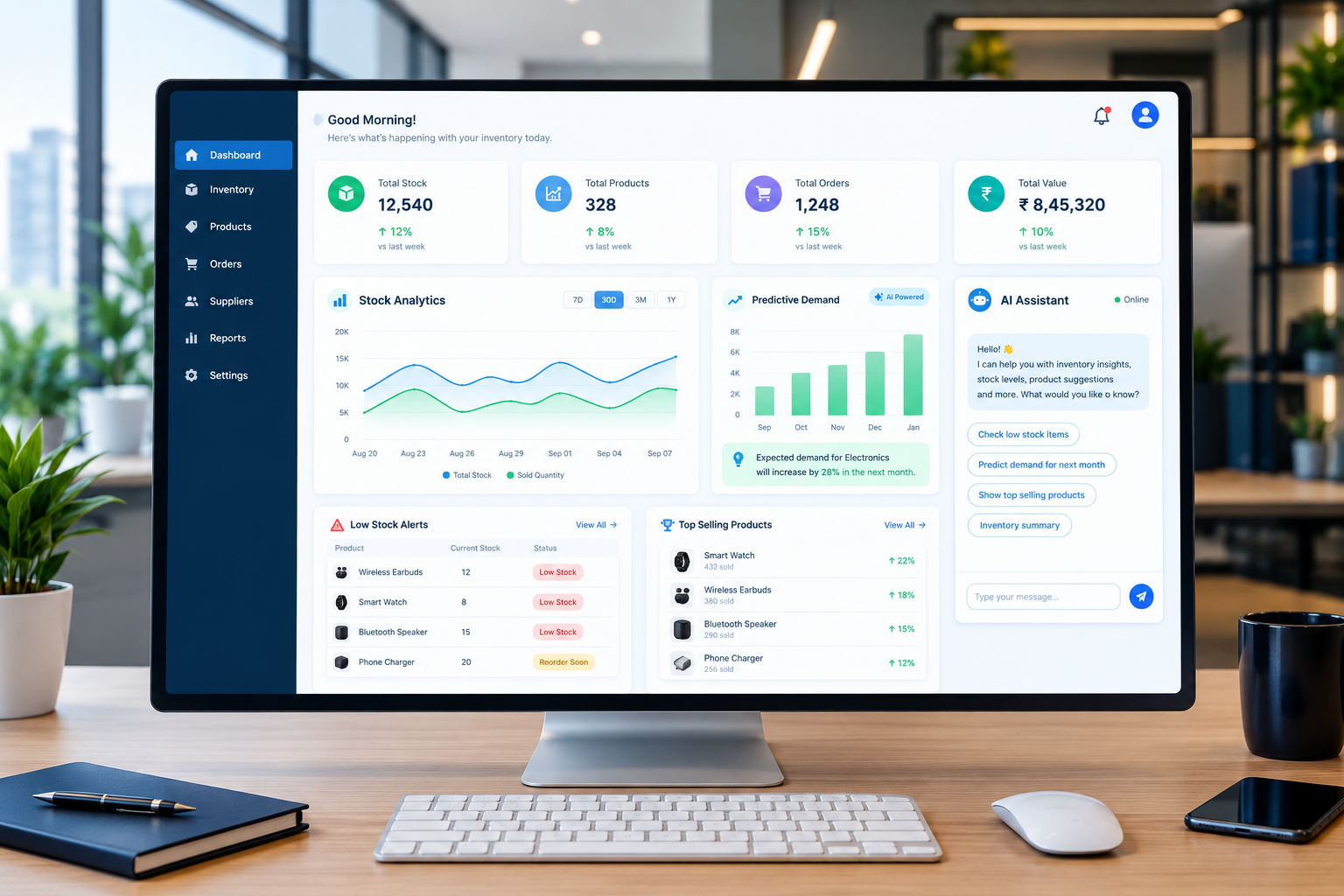
1. Centralised Inventory Dashboard
A centralised dashboard gives the business a single place to view important inventory information.
The dashboard may include:
- Total products.
- Available stock.
- Low-stock items.
- Out-of-stock products.
- Recent stock movements.
- Purchase and sales information.
- Product categories.
- Inventory reports.
Instead of checking different spreadsheets or records, the team can access relevant information through one system.
A well-designed dashboard should be simple, responsive, and easy to understand, even for users who are not technically experienced.
2. AI-Based Stock Analysis
One of the useful applications of Artificial Intelligence in inventory management is data analysis.
An AI system can examine available inventory and sales information to identify patterns.
For example, it may help answer questions such as:
- Which products are selling more frequently?
- Which products have had limited movement?
- Which items may require attention?
- Are there changes in product demand?
- Which categories have experienced increased sales activity?
These insights can help business owners understand their inventory more clearly.
However, AI-generated insights should be treated as decision-support information. The accuracy of the results depends on the quality, completeness, and consistency of the underlying data.
3. Low-Stock Alerts
Running out of an important product can affect sales and customer satisfaction.
An inventory management system can monitor stock quantities and notify authorised users when a product reaches a predefined threshold.
For example:
Product A has reached its minimum stock level. Please review the available quantity and purchasing requirements.
Notifications may be delivered through:
- Dashboard alerts.
- Email notifications.
- SMS notifications.
- In-app notifications.
The alert system can be configured according to the business's product categories and stock policies.
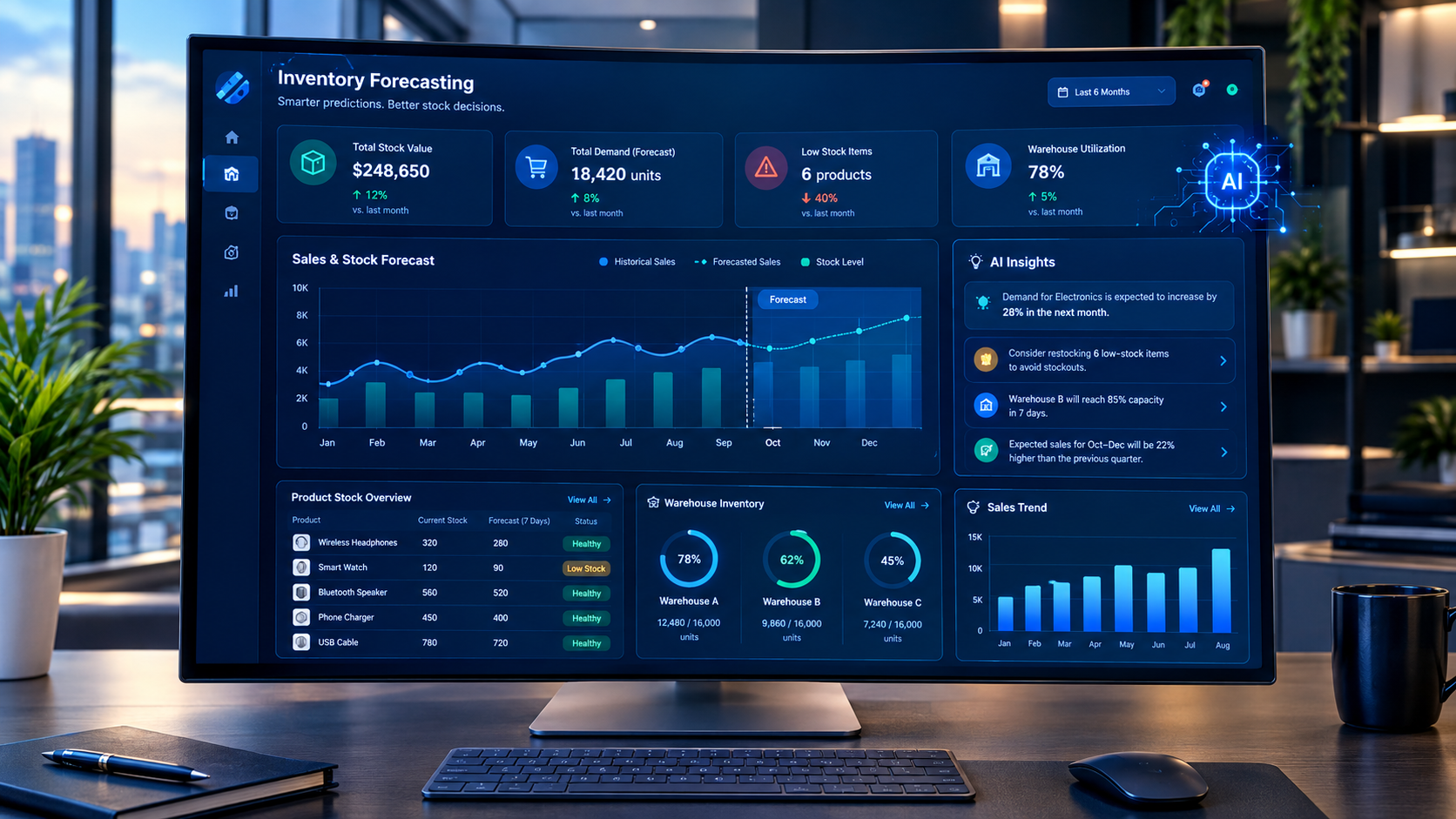
4. Inventory Forecasting
Inventory forecasting is one of the areas where AI can provide additional value.
An AI-based system can analyse historical sales data, product movement, and other relevant information to estimate possible future inventory requirements.
For example, if a product has shown a consistent increase in demand during a particular period, the system may identify that pattern and provide a forecast.
However, forecasting is not always exact. Seasonal changes, market conditions, promotions, supplier delays, and unexpected demand can affect the results.
Therefore, AI forecasting should support human decision-making rather than replace it completely.
5. AI Inventory Assistant
A conversational AI assistant can make inventory information easier to access.
Instead of searching through multiple reports, authorised users may be able to ask questions in simple language.
For example:
User:
"Show me the products with low stock."
AI Assistant:
"Here are the products currently below their configured stock thresholds."
User:
"Which products had the highest sales last month?"
AI Assistant:
"Here is a summary based on the available sales records."
User:
"How many units of Product B are available?"
AI Assistant:
"The current recorded stock quantity is displayed in the inventory system."
This type of assistant can save time, but it must be connected to reliable business data. It should also have appropriate access controls so that confidential inventory information is not exposed to unauthorised users.
6. Product and Category Management
A good inventory management system should make it easy to manage product information.
Depending on the business, the system may include:
- Product names.
- Product codes or SKUs.
- Product categories.
- Product descriptions.
- Purchase prices.
- Selling prices.
- Available quantities.
- Product images.
- Supplier details.
- Minimum stock levels.
Custom fields can also be added when a business requires specific product information.
This flexibility is especially useful for businesses that sell different types of products or manage complex inventory structures.
7. Automated Inventory Reports
Preparing inventory reports manually can take considerable time.
A custom AI inventory management system can automate the generation of useful reports, such as:
- Daily inventory summaries.
- Product movement reports.
- Stock availability reports.
- Low-stock reports.
- Purchase-related reports.
- Sales and inventory comparisons.
- Category-wise inventory analysis.
Reports can be displayed through the dashboard or exported in commonly used formats, depending on the system's requirements.
Automation helps reduce repetitive work and gives management easier access to important information.
8. User Roles and Admin Panel
Inventory data may contain sensitive business information. For this reason, user access and permissions are important.
A custom inventory management application can include an admin panel where authorised administrators manage users and system settings.
Possible user roles include:
- Super Admin.
- Inventory Manager.
- Warehouse Staff.
- Sales Team.
- Purchase Manager.
- Reporting User.
Each role can be assigned suitable permissions.
For example, warehouse staff may update stock quantities, while only authorised managers can change inventory settings or access financial reports.
The exact permission structure should be designed according to the business's workflow.
How the AI Inventory Management Workflow Can Work
A typical AI-powered inventory management process may follow these steps:
Step 1: Collect Inventory Data
The system receives information from inventory records, sales software, purchase records, or other connected sources.
Step 2: Organise and Validate the Data
The application checks the available data and organises it into a consistent structure.
Data quality is important because incorrect or incomplete records can affect AI-generated results.
Step 3: Analyse Stock Information
The AI system analyses relevant information to identify patterns, product movement, and possible inventory-related issues.
Step 4: Generate Useful Insights
The system displays alerts, summaries, reports, or forecasting information through the dashboard.
Step 5: Support Business Decisions
The inventory team reviews the information and takes appropriate action, such as checking stock, planning purchases, or reviewing product performance.
Step 6: Improve the System Over Time
As more reliable data becomes available, the business can improve reporting, automation, and AI features according to its changing requirements.
Technologies Used to Build Custom AI Inventory Software
The technology stack for an AI inventory management tool depends on the project's complexity, budget, integrations, and scalability requirements.
A custom solution may include the following components:
| Component | Possible Technology |
|---|---|
| Frontend | React, Next.js, or another modern framework |
| Backend | Node.js, Python, PHP, or another suitable technology |
| Database | MySQL, PostgreSQL, MongoDB, or another database |
| AI Integration | Machine learning models, AI APIs, or custom AI services |
| Dashboard | Responsive web dashboard |
| Authentication | Secure login and role-based access |
| Notifications | Email, SMS, or in-app alerts |
| Hosting | Cloud or dedicated server infrastructure |
| Reporting | Custom reports and data visualisation |
These are examples of possible technologies, not a fixed stack for every HNB IT Solutions project.
The right technology should be selected after understanding the client's requirements.
Benefits of Using an AI Tool for Inventory Management
A properly designed AI inventory management system can provide several business benefits.
Reduced Manual Work
Automation can help reduce repetitive tasks such as preparing reports, checking stock levels, and reviewing inventory records.
Better Visibility
A centralised dashboard makes it easier to understand available stock and inventory activity.
Faster Access to Information
AI assistants and organised reports can help users find relevant information more quickly.
Improved Inventory Planning
AI-based analysis may help identify trends and support purchasing decisions.
Fewer Data-Entry Mistakes
Automated workflows and validation checks can reduce certain types of manual errors.
Scalable Business Operations
A custom system can be expanded as the business adds products, users, warehouses, or new requirements.
Better Business Decisions
Clear inventory data and useful AI insights can help management make more informed operational decisions.
It is important to remember that the actual results depend on the system design, data quality, employee adoption, and the way the software is used.
AI Inventory Management vs Traditional Inventory Software
Both traditional inventory software and AI-powered inventory tools can be useful. The main difference is the level of analysis and automation they provide.
| Feature | Traditional Inventory Software | AI Inventory Management Tool |
|---|---|---|
| Product management | Yes | Yes |
| Stock tracking | Yes | Yes |
| Inventory reports | Yes | Yes |
| Automated alerts | Depends on the software | Can be configured |
| Data analysis | Basic to advanced, depending on the system | AI-supported analysis |
| Demand forecasting | May require additional features | Can support AI-based forecasting |
| AI assistant | Usually not included | Can be integrated |
| Custom workflows | Depends on the platform | Can be developed around business needs |
| Scalability | Depends on architecture | Depends on architecture and implementation |
AI does not automatically make every inventory system better. The most suitable solution depends on the business's actual needs and the quality of the implementation.
Security Considerations for AI Inventory Management Software
Inventory systems may contain business-sensitive information, including product costs, supplier details, sales data, and stock records.
Security should therefore be considered during the development process.
Important security measures may include:
- Secure user authentication.
- Role-based access control.
- Encrypted data transmission.
- Secure database configuration.
- Regular backups.
- Activity logs.
- Input validation.
- Secure API integration.
- Server security.
- Monitoring and maintenance.
If an AI assistant is connected to inventory data, its access should also be limited according to user permissions.
At HNB IT Solutions, security and scalability can be considered while designing custom software according to the client's technical requirements.
How Much Does AI Inventory Management Software Cost?
The cost of developing an AI tool for inventory management depends on the features, complexity, integrations, and technology requirements.
A basic inventory management application may include:
- Product management.
- Stock tracking.
- Admin dashboard.
- User management.
- Basic reporting.
A more advanced AI-powered solution may include:
- AI inventory assistant.
- Demand forecasting.
- Automated reports.
- Multiple warehouse management.
- Supplier integrations.
- Sales and accounting integrations.
- Advanced analytics.
- Custom AI models.
- Mobile application support.
The development cost may also be affected by:
- Number of users.
- Number of products.
- Required integrations.
- Data migration.
- Cloud hosting.
- Security requirements.
- Maintenance and support.
- Custom UI/UX design.
There is no single fixed price for every AI inventory project. A proper cost estimate should be prepared after understanding the business workflow and required features.
HNB IT Solutions provides custom software development services based on individual business requirements.
Why Choose HNB IT Solutions for AI Inventory Management Software?
HNB IT Solutions is a software development company based in Delhi, India, providing custom digital solutions for businesses.
Our development services include:
- AI Tools Development.
- Mobile App Development.
- Web App Development.
- Custom Software Development.
- Payment Gateway Integration.
- SMS and Bulk SMS Services.
- Digital Marketing Services.
- Software Consultancy.
For businesses looking to develop an AI tool for inventory management, a custom application can be designed according to their products, workflows, reporting requirements, and future plans.
Our approach focuses on developing software that is practical, scalable, and aligned with business needs.
Whether you need a web-based inventory dashboard, a mobile inventory application, an AI assistant, or a complete custom inventory management platform, the solution can be planned around your requirements.
Final Thoughts
Inventory management is becoming more technology-driven as businesses handle larger product catalogues, increasing customer expectations, and more complex operations.
An AI tool for inventory management can help businesses analyse stock data, automate repetitive tasks, identify inventory patterns, and improve access to important information.
However, successful inventory software is not only about adding AI features. It also requires a well-planned workflow, accurate data, a user-friendly interface, secure infrastructure, and proper integration with existing business systems.
The right solution is one that solves real problems and can grow with the business.
At HNB IT Solutions, we help businesses turn their software ideas into practical digital solutions through AI development, web application development, mobile app development, and custom software services.
If you are planning to build an AI-powered inventory management tool for your business, our team can help you explore the right features and development approach.